Option 1: Connecting Mediant Cloud Edition (CE) SBC Devices to OVOC on Azure using Public IP Address
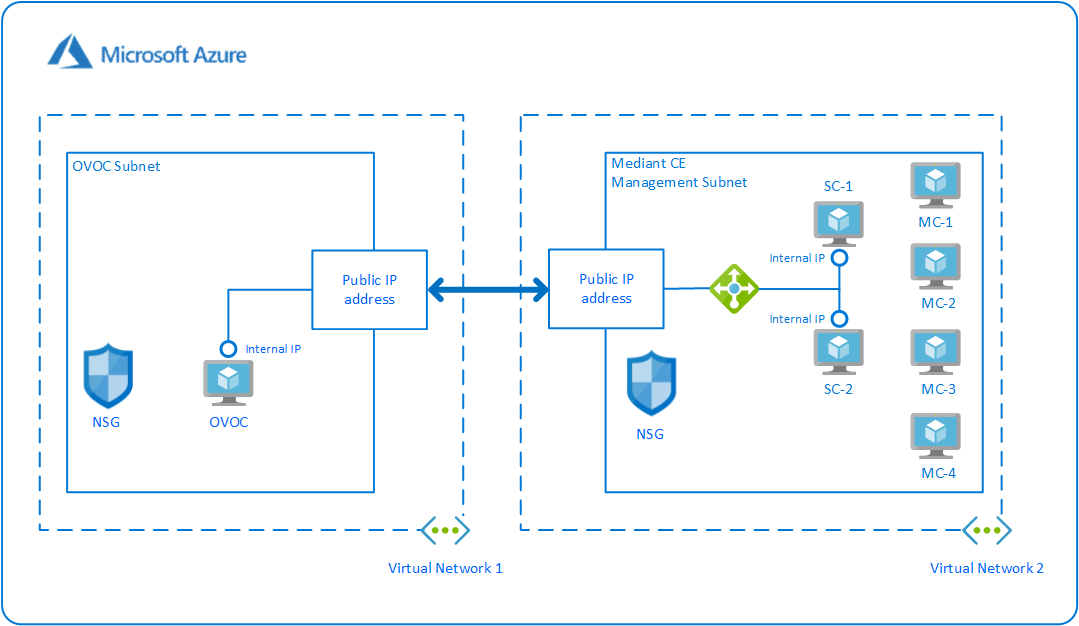
This section describes how to establish a secure connection between the OVOC server and Mediant Cloud Edition (CE) SBC devices which are both deployed in the Azure Cloud in separate Virtual networks. Communication between OVOC and Mediant CE SBC devices is carried over the public IP addresses on both sides, requiring NAT translation from internal to public IP addresses. This is performed by configuring the OVOC server with the public IP address of the Azure platform where the OVOC server is installed (see Configure OVOC Server with NAT IP Address per Interface ). The figure below illustrates this topology.
The Mediant CE SBC devices must be added to OVOC using Automatic Detection. Refer to Section "Adding AudioCodes Devices Automatically" in the OVOC User's Manual.
Microsoft Azure Topology
This section includes the following procedures:
| 1. | Configuring the OVOC Server Manager on Azure (Public IP) |
| 2. | Configuring Mediant Cloud Edition (CE) SBC Devices on Azure (Public IP) |